Animation
Animation Data는 KeyFrame 기준 Data로 Sampling 되어 저장된다.
일단 KeyFrame 그대로 Local Matrix를 반영하여 출력하면 애니메이션이 나오긴 할텐데, 매우 끊겨보일 것이다.
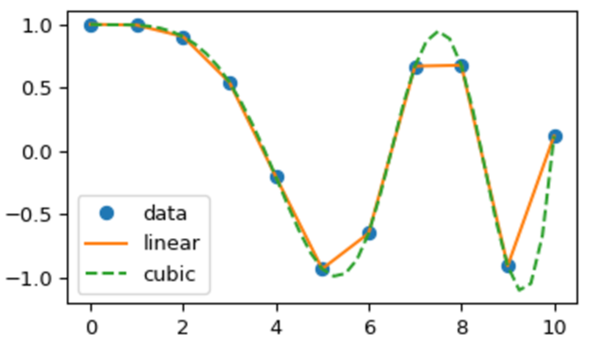
그러므로 우리는 Sampling 된 KeyFrame Data 간의 추가적인 보간 작업을 해주어야 하는데,
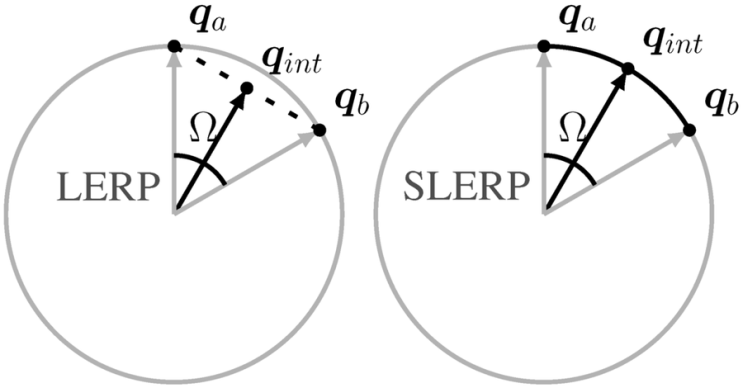
Scale, Position은 Lerp(선형보간)을 통해 KeyFrame 간의 보간을 해주면 된다.
하지만 Rotation은 Slerp(구면선형보간)을 통해 KeyFrame 간의 보간을 해주어야 한다.
Rotation의 경우 Format 마다 저장되는 방식이 다를 수 있다.
float _time = 0;
float _angle = 0;
Vector3 _rot = Vector3();
_time = (Parsing_NumberFloat() / m_scenedata.m_TicksPerFrame) - m_scenedata.m_FirstFrame;
_rot = Parsing_ChangeNumberVector3();
_angle = Parsing_NumberFloat();

m_Animation->m_AniData.back()->m_Time = _time;

// 현재 Frame Quaternion 추출..
Quaternion nowQT = XMQuaternionRotationAxis(_rot, _angle);

// Quaternion 값은 누적시켜주자..
if (m_Animation->m_AniData.size() > 1)
{
	m_Animation->m_AniData.back()->m_RotQt = XMQuaternionMultiply(m_Animation->m_AniData[m_Animation->m_AniData.size() - 2]->m_RotQt, nowQT);
}
else
{
	m_Animation->m_AniData.back()->m_RotQt = nowQT;
}
ASE의 경우 이전 Frame 기준 변위량이라 계속해서 누적을 해주어야 한다. 이게 무슨말이냐면 Animation Roation 정보가 기본 Mesh 원 상태에서의 Rotation 값이 아닌 현재 Frame 기준 이전 Frame에서의 변위량이라는 소리이다.
예를들어 현재 Frame이 3번째라면 2번째 Frame 기준 변위량인 것이다. 즉, ASE에서의 Rotation 값은 누적시켜서 저장하면 된다.
// Animation Data 삽입..
FbxTime::EMode timeMode = pScene->GetGlobalSettings().GetTimeMode();
for (FbxLongLong index = 0; index < m_OneAnimation->m_TotalFrame; index++)
{
	FbxTime takeTime;
	takeTime.SetFrame(m_OneAnimation->m_StartFrame + index, timeMode);

	// Local Transform = 부모 Bone의 Global Transform의 Inverse Transform * 자신 Bone의 Global Transform
	FbxAMatrix nodeTransform = node->EvaluateLocalTransform(takeTime);

	DirectX::SimpleMath::Matrix nodeTRS = ConvertMatrix(nodeTransform);

	XMVECTOR scale;
	XMVECTOR rot;
	XMVECTOR pos;

	XMMatrixDecompose(&scale, &rot, &pos, nodeTRS);

	OneFrame* newAni = new OneFrame;

	newAni->m_Time = (float)index;
	newAni->m_Pos = DirectX::SimpleMath::Vector3(pos);
	newAni->m_RotQt = Quaternion(rot);
	newAni->m_Scale = DirectX::SimpleMath::Vector3(scale);

	m_OneAnimation->m_AniData.push_back(newAni);
}

// 해당 Mesh에 애니메이션 삽입..
if ((m_ParsingMode & ANIMATION_ONLY) != ANIMATION_ONLY)
{
	m_OneMesh->m_Animation = m_OneAnimation;
}
FBX의 경우는 좀 다른데 현재 Frame의 시간을 넣으면 해당 시간대의 Node Matrix가 나오는데 해당 Matrix를
Decompose(Scale, Rot, Pos로 추출) 하여 해당 정보를 저장하면 된다. 즉, 이미 Rotation 값은 이전 Frame 기준이 아닌 초기값 기준 Rotation 값이라는 소리다.
이렇게 Animation Data를 저장한 후 해당 KeyFrame 간의 보간을 통해 재생하여 주면 자연스러운 애니메이션이 나올 것이다.
'Graphics' 카테고리의 다른 글
| [DirectX 11] Terrain Mesh Blending (0) | 2021.12.20 |
|---|---|
| [DirectX 11] Map / UnMap vs UpdataSubresource (0) | 2021.12.19 |
| [DirectX 11] Skinning Mesh (0) | 2021.12.18 |
| [DirectX 11] Normal Mapping (0) | 2021.12.18 |
| [DirectX 11] Gamma Correction (0) | 2021.12.18 |